

Best Book Writing Software for Fiction Writers | SeaBell
Best Book Writing Software for Fiction Writers in 2026
There is no single best book writing software. There is only the tool that fits the part of your writing process that keeps breaking.
For one writer, the problem is getting a clean draft on the page. For another, it is keeping a fantasy series from contradicting itself after chapter twelve. A self-publisher may care most about formatting. A co-writer may need comments, sharing, and version control more than character cards.
That is where feature lists start to mislead people. A tool with fifty panels is not better if all you need is a quiet drafting space. A minimalist editor is not enough if your plot depends on character histories, location rules, and timeline decisions that keep drifting out of view.
We compared book writing tools by workflow rather than by raw feature count. Where access was available, we tested the same fiction scenario: starting a book project, shaping an opening chapter, tracking story context, drafting or revising a scene, and checking where the tool made the process smoother or slower.
The test premise was simple:
A disgraced apprentice cartographer discovers that every map she draws changes the borders of a hidden kingdom.
That gave each tool the same job: support a novel-length project with a first chapter, a clear scene goal, and at least one continuity note that would matter later.
🔍 Quick Verdict: Best Book Writing Software by Workflow
- SeaBell: AI-assisted fiction workflow.
Checked: Workflow fit checked.
Strongest workflow: Keeping fiction context close to chapter drafting.
Limitation: Not a formatting or publishing handoff tool.
- Scrivener: Serious manuscript organization.
Checked: Hands-on local test.
Strongest workflow: Binder structure, scene organization, notes, corkboard, outline, compile setup.
Limitation: Powerful but manual; learning curve is real.
- Reedsy Studio: Free writing and formatting workflow.
Checked: Hands-on Chrome test.
Strongest workflow: Manuscript drafting, planning board, PDF/EPUB export path.
Limitation: Not a deep canon or AI drafting system.
- Campfire: Worldbuilding-heavy projects.
Checked: Hands-on Chrome test.
Strongest workflow: Story modules for characters, maps, timelines, research, lore, and manuscript writing.
Limitation: Dense interface and heavier setup.
- The Novel Factory: Guided novel planning.
Checked: Hands-on Chrome test.
Strongest workflow: Step-by-step roadmap, premise panels, plot cards, characters, manuscript metadata.
Limitation: Tutorial-heavy and less useful if you dislike structured guidance.
- ProWritingAid: Editing and revision support.
Checked: Hands-on Chrome test.
Strongest workflow: Grammar, sticky sentence, length, critique, character, manuscript, and polish tools.
Limitation: Companion editor, not a full book workspace.
- Google Docs: Simple free drafting and collaboration.
Checked: Hands-on Chrome test.
Strongest workflow: Fast blank-page drafting, comments, sharing, cloud saving.
Limitation: Weak long-form fiction structure and no story memory.
- Hemingway Editor: Quick readability pass.
Checked: Hands-on Chrome test.
Strongest workflow: Sentence complexity, readability, weakener checks.
Limitation: Not book writing software by itself.
- Atticus: Formatting and publishing handoff.
Checked: Official page checked.
Strongest workflow: Positioned around writing plus print/eBook formatting.
Limitation: Needs hands-on testing before a stronger verdict.
- Plottr: Visual outlining and story bible planning.
Checked: Official page checked.
Strongest workflow: Positioned around visual timelines, plot templates, character sheets, and story bible planning.
Limitation: Needs hands-on testing before a stronger verdict.
- Novelcrafter and Sudowrite: Story memory and AI scene momentum.
Checked: Dedicated comparison available.
Strongest workflow: Useful comparison for canon-heavy AI fiction workflows.
Limitation: Better handled in a focused two-tool review.
Read the table by bottleneck, not by brand familiarity.
A scattered draft points toward Scrivener, Reedsy Studio, The Novel Factory, or Google Docs. A sprawling story world points toward Campfire. A visual outline problem makes Plottr worth researching, with the caveat that the Plottr notes here come from official material rather than a live workspace. A finished-but-rough manuscript belongs in ProWritingAid or Hemingway before it belongs in another planning app. If the difficult part is keeping fiction context close while drafting with AI support, SeaBell belongs in the comparison. And if the real decision is Novelcrafter versus Sudowrite, use the dedicated comparison instead of trying to solve that narrow choice inside a broad roundup.
🧪 How We Tested These Book Writing Tools
The goal was not to see which tool had the longest menu. The goal was to see how each tool handled a normal fiction workflow:
- Start or open a book project.
- Add or organize a first chapter.
- Keep an outline, scene plan, character note, worldbuilding note, or continuity note near the draft.
- Draft or paste the same opening scene.
- Check whether revision, formatting, exporting, or collaboration support was visible.
- Notice where the interface became helpful, heavy, or misleading.
For hands-on tools, we used the hidden-kingdom cartographer premise and a test scene where the protagonist redraws a forbidden border during a royal inspection. That scene needed tension, a clear chapter goal, and a continuity note that could matter later.
A quick note on access: Atticus was checked from its official product page and login gate because no active workspace was available. Plottr was checked from its official product page only. The strongest verdicts below belong to the tools we could actually open and use.
SeaBell is included for one specific reason: it fits the problem of drafting with story context nearby. If that is not your bottleneck, its role in the comparison should stay narrow.
🧭 What Fiction Writers Actually Need from Book Writing Software
Most writers do not need every feature in one app. They need the right support at the right stage.
Before choosing software for writing a book, ask which part of the process is failing.
If you want to compare the official product pages while reading this review, open them as reference points rather than proof that every feature will fit your book: Scrivener, Reedsy Studio, Campfire, The Novel Factory, ProWritingAid, Google Docs, Hemingway Editor, Atticus, Plottr, Novelcrafter, and Sudowrite.
Drafting: Can you open the project quickly and write without fighting the interface?
Chapter organization: Can you break the manuscript into chapters and scenes, then move them without wrecking the draft?
Planning: Can you hold a chapter outline, scene card, or beat list somewhere usable, not buried in a separate document you forget to open?
Story memory: Can the tool track character details, worldbuilding rules, timelines, locations, relationship states, clue timing, invented terms, or the kind of reference material a story bible usually holds?
AI support: If the tool uses AI, does it understand enough story context to help with fiction drafting, or does it only generate isolated text?
Editing: Does it help with grammar, pacing, sentence clarity, continuity, or revision? Or does it leave that work to another app?
Formatting and export: Can it produce a clean manuscript, print-ready file, EPUB, DOCX, or other handoff format?
Collaboration: Can another person read, comment, or edit without a messy file exchange?
Learning curve: Does the setup cost make sense for your book? A dense worldbuilding system may be perfect for a fantasy trilogy and ridiculous for a short nonfiction draft.
The best novel writing software is rarely the app with the most impressive feature page. The better test is whether it keeps today's draft problem from becoming tomorrow's rewrite problem.
The most useful lesson from the test was not that one interface looked nicer than another. Most tools could accept the same opening scene. The real difference appeared after the scene existed: could the continuity note stay near the draft, or did the writer have to remember it manually?
Beginners often miss that kind of friction because it arrives late. A tool can feel easy during chapter one and still become expensive later if every revision forces you to rebuild the same context from scratch.
📚 Best Novel Writing Software vs General Book Writing Software
Book writing software and novel writing software overlap, but they do not solve the same problem.
General book writing software focuses on drafting, formatting, export, collaboration, or publishing handoff. That can be enough for nonfiction, a short ebook, a memoir, or a manuscript that does not depend on many recurring story decisions.
Novel writing software has to carry more story state. Scenes need order. Character choices need consequences. World rules, clue timing, relationship changes, locations, and invented terms may matter twenty chapters after they first appear. A novelist can still write in a general tool, but the missing fiction structure has to live somewhere.
The split usually does not show up on the first writing day. It shows up when you change an early scene and then have to stop and ask whether chapter sixteen still makes sense. A general editor may hold the text. A novel-focused workspace is more useful when it keeps notes close enough to the prose that you can check whether chapter sixteen still follows from chapter three.
For a simple draft, Google Docs or Reedsy Studio may be enough. For a complex manuscript, Scrivener, Campfire, The Novel Factory, Plottr, Novelcrafter, or SeaBell may deserve a closer look depending on whether your bottleneck is structure, worldbuilding, visual planning, story memory, or AI-assisted drafting context.
📊 Workflow Snapshot: Where Each Tool Fits
Use this section as a readable alternative to a giant comparison table. The point is not to score every feature equally; it is to see which tool solves which writing problem.
SeaBell
SeaBell fits AI-assisted long-form fiction drafting. Its role is strongest when the writer wants character, chapter, and worldbuilding context close to the draft. It is not the main choice for print formatting or a traditional publishing handoff.
Scrivener
Scrivener is strongest for manuscript organization. In the local macOS test, it handled scene drafting, binder structure, inspector notes, corkboard view, outline view, and compile setup. The learning curve is real, but so is the control.
Reedsy Studio
Reedsy Studio is the best free writing-to-formatting path from this test. It gave us a clean manuscript editor, a planning board, and a visible PDF/EPUB export path. It is less convincing as a deep story-memory or AI drafting system.
Campfire
Campfire is the best fit for worldbuilding-heavy projects. Its modules cover manuscript writing, characters, locations, maps, timelines, research, lore, and more. The tradeoff is setup weight: it is powerful because it is dense.
The Novel Factory
The Novel Factory is strongest for guided novel planning. It gives writers a roadmap, premise and synopsis panels, plot cards, character/location modules, and scene metadata near the manuscript. It is less attractive if you already have your own process.
ProWritingAid
ProWritingAid belongs after text exists. It is strongest for grammar, sticky sentences, length, critique-style reports, character analysis, manuscript analysis, and polish suggestions. It is an editing layer, not a full book workspace.
Google Docs
Google Docs is the simplest drafting and collaboration baseline. It is familiar, fast, and easy to share. Its weakness is long-form fiction structure: scenes, worldbuilding rules, timelines, and canon all have to be managed manually.
Hemingway Editor
Hemingway is useful for a quick readability pass. It can flag sentence complexity and weakener patterns quickly, but it does not plan, organize, remember, format, or manage a book.
Atticus
Atticus appears most relevant for formatting and publishing handoff based on its official page and login gate. We could not access an active workspace, so it should stay on the shortlist only if you are ready to test project creation, formatting output, and export quality yourself.
Plottr
Plottr is worth researching if visual outlining is the messy part of your process. Its official page positions it around visual timelines, plot templates, character sheets, and story bible planning. Because our check was official-page only, treat it as a trial candidate rather than a full verdict.
🌊 SeaBell Review: Best AI-Assisted Fiction Workflow Option
SeaBell makes sense under a specific writing problem: the handoff from planning into AI-assisted fiction drafting. That is the moment when a character note, chapter brief, worldbuilding rule, or continuity decision needs to stay close to the scene being written.
That matters most in long-form fiction. A romance series may need relationship state to stay consistent. A fantasy draft may need invented terms, magic rules, and location logic near the chapter. A mystery may need clue timing to remain visible while a new scene is drafted.
SeaBell should not be framed as the best book writing software overall, and it is not the tool to choose if your main need is print formatting or a traditional compile/export pipeline. The clearer role is narrower: AI-assisted long-form fiction drafting where the surrounding story context still matters.
For feature-by-feature product detail, the SeaBell AI Book Writer page is a better next step once AI-assisted drafting is the category you want to explore.
🗂️ Scrivener Review: Best for Serious Manuscript Organization
Scrivener is one of the clearest examples of software built around the structure of a book rather than a single document.
In local testing on macOS, we created a novel project from Scrivener's novel template and used the shared cartographer scene inside the default Manuscript > Chapter > Scene structure. The project opened with a binder that separated manuscript material from Characters, Places, Front Matter, Notes, Research, Sample Output, Template Sheets, and Trash.
That structure is the point. Scrivener makes it easy to treat a book as a set of movable parts. A scene can exist inside a chapter, a chapter can sit inside a manuscript, and research or notes can stay inside the same project instead of scattered across folders.
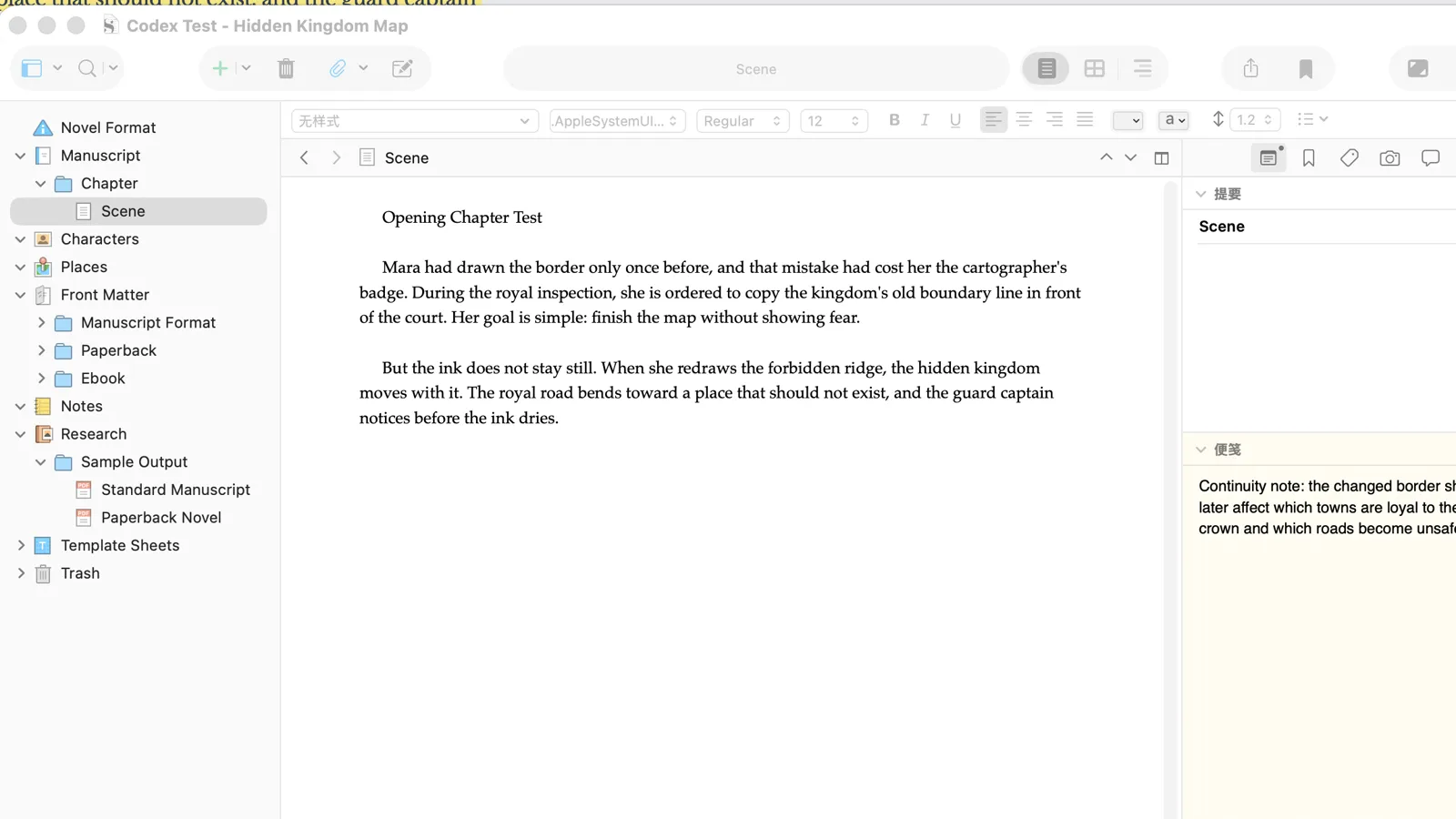
The most useful moment in testing was switching between the scene draft, inspector notes, corkboard view, and outline view. The continuity note could sit beside the scene. The same chapter could become a corkboard card with a text preview. Outline view exposed metadata such as label, status, section type, target, and progress. For a novelist who thinks in scenes, this is useful structure.
The tradeoff is that Scrivener is powerful because it is manual. It does not write the scene for you. It does not automatically manage canon. It does not behave like a frictionless collaboration app. The compile panel also introduces its own concepts, formats, and decisions. We opened compile setup and observed manuscript, paperback, outline, proof, and script-style formats, but did not generate export files.
Scrivener is the right shortlist pick when your draft is becoming too big for one document and you want serious control over the manuscript. It is a weaker fit when you mainly need quick collaboration, AI scene drafting, or a simple writing surface. Fame alone is not a good reason to take on its structure.
📘 Reedsy Studio Review: Best Free Writing and Formatting Workflow
Reedsy Studio performed well in testing as a free writing-to-formatting workspace. It felt less like a blank document and more like a book project with a manuscript, planning area, and export path.
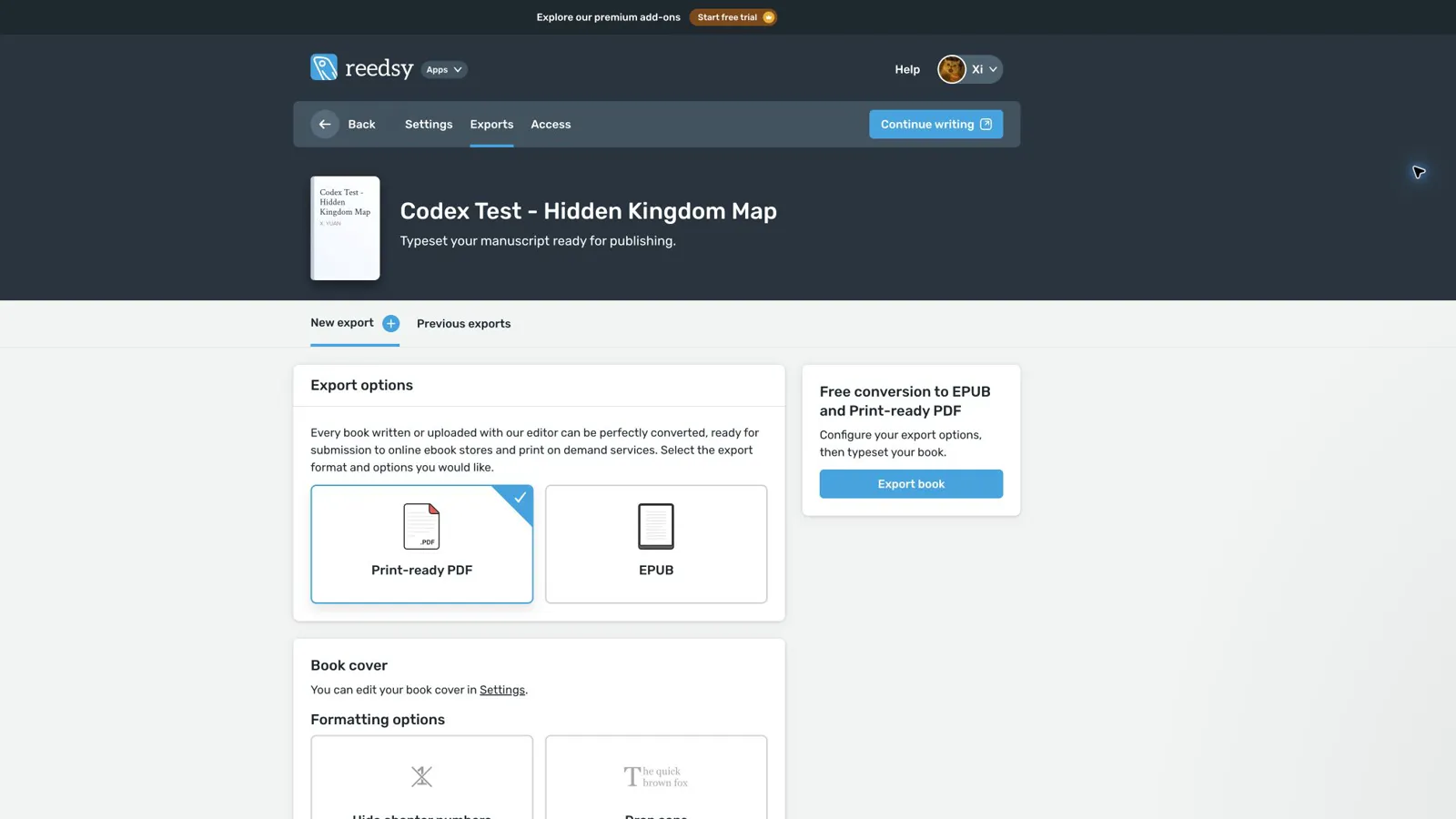 We created a test book, added the shared fiction scene to Chapter 1, opened the planning board, and checked the export screen. The manuscript editor was clean, and the default book structure included front matter, body, back matter, table of contents, and chapter material. The planning board loaded a Hero's Journey example with act-based cards, and the Add menu included note, folder, worldbuilding, character, setting, narrative device, and template options.
The export path is the biggest reason Reedsy belongs in a best book writing software review. The export screen showed print-ready PDF and EPUB options, along with formatting choices such as chapter-number visibility and drop caps. For writers who want to move from draft to a presentable book file without learning a heavyweight formatting system, that is meaningful.
Where Reedsy thins out is story memory. It can hold planning assets, but it did not feel like a deep fiction-canon system. The manuscript and planning board are part of the same book project, but the writer still manages the relationship between notes and prose. We did not observe AI drafting, prose coaching, or automatic continuity support.
Use Reedsy Studio when you want a low-cost path from writing to export and you like a clean book-project interface. If the real issue is canon management, AI-assisted chapter drafting, or a highly customized manuscript system, compare it with SeaBell, Scrivener, Campfire, or Novelcrafter before committing.
🗺️ Campfire Review: Best for Worldbuilding-Heavy Projects
Campfire was the densest tool in our test, and that is both its strength and its warning label.
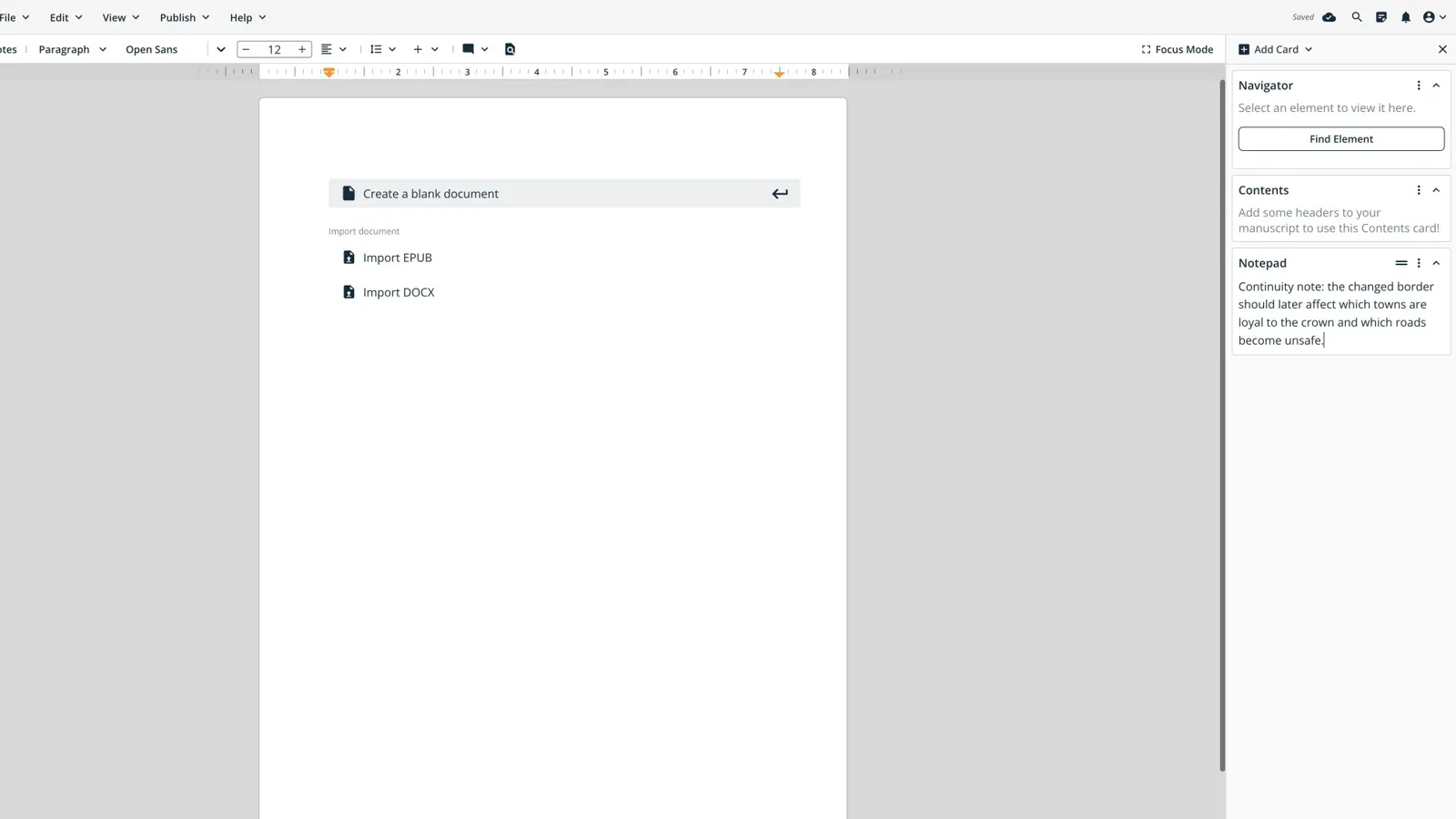
After onboarding, we created a test project with the hidden-kingdom premise, opened the project dashboard, created a manuscript chapter, pasted the shared scene, and used the right-side Notepad card for the continuity note. The manuscript editor included nearby cards and controls such as Navigator, Contents, Notepad, Add Card, Find Element, Focus Mode, Find/Replace, and formatting tools.
The module list was much broader than a normal writing app. We observed Manuscript, Characters, Locations, Maps, Research, Timeline, Calendar, Arcs, Relationships, Encyclopedia, Magic, Species, Cultures, Items, Systems, Languages, Religions, and Philosophies.
For fantasy, science fiction, RPG-adjacent fiction, or any series with heavy lore, that depth is genuinely useful. A writer can build a world around the manuscript rather than keeping maps in one tool, timelines in another, and character notes in a third. Campfire's strongest fit is not "fast blank page." It is "I need a project bible with a manuscript editor attached."
The friction is real. Setup took more effort than Reedsy or Google Docs. The interface is module-heavy, some controls are icon-heavy, and first contact can feel busy. We did not complete a separate character card, map upload, timeline build, export, or collaboration workflow, so those should not be assumed from this test.
Campfire earns its place when the story world is complex enough to justify the setup. For mostly linear drafting with light notes, it can feel like building a control room before the scene exists.
🧩 The Novel Factory Review: Best Guided Novel-Planning Workflow
The Novel Factory is for writers who want the process itself to be visible.
The default trial project opened into a roadmap with a step-by-step novel-writing sequence: premise, plot outline, character introductions, short synopsis, extended synopsis, goal-to-decision cycle, character development, scene blocking, first draft, locations, subplots, viewpoints, redrafting, feedback, and publishing.
The planning panels were highly structured. The premise and synopsis area included fields for character, situation, objective, opponent, disaster, summary, short synopsis, extended synopsis, pitch, and moral statement. Plot Manager included chapters, plot templates, and index cards. Character pages and notes were available, and the manuscript view included related scene information such as summary, notes, point-of-view character, weather, date/time, goal-to-decision cycle, and custom fields.
In practice, The Novel Factory is strongest before and around the first draft. The value is not the writing surface alone; it is the guided process for turning a premise into a planned novel, then connecting scene-level metadata to the manuscript.
The same guidance can also be the drawback. Writers who already know their process may find it too instructional. The interface felt denser and more tutorial-driven than Reedsy or Google Docs. We did not verify export, collaboration, or AI drafting support during this test.
The Novel Factory is worth testing if you want the tool to tell you what to think through next. It is easier to skip if you already have a planning method and mainly need a clean writing or revision environment.
📝 ProWritingAid Review: Best Editing and Revision Support
ProWritingAid belongs in a book writing software roundup only if its role is clear: it is strongest after text exists.
We completed onboarding for a creative writer working on a first book, created a new document, and pasted the shared fiction scene. The editor surfaced story and prose tools such as Chapter Critique, Character Analysis, Manuscript Analysis, Grammar Report, Sticky Sentences Report, Length Report, and polish suggestions. The test scene produced visible underlined suggestions and premium polish prompts around phrases such as "very afraid" and "very quiet."
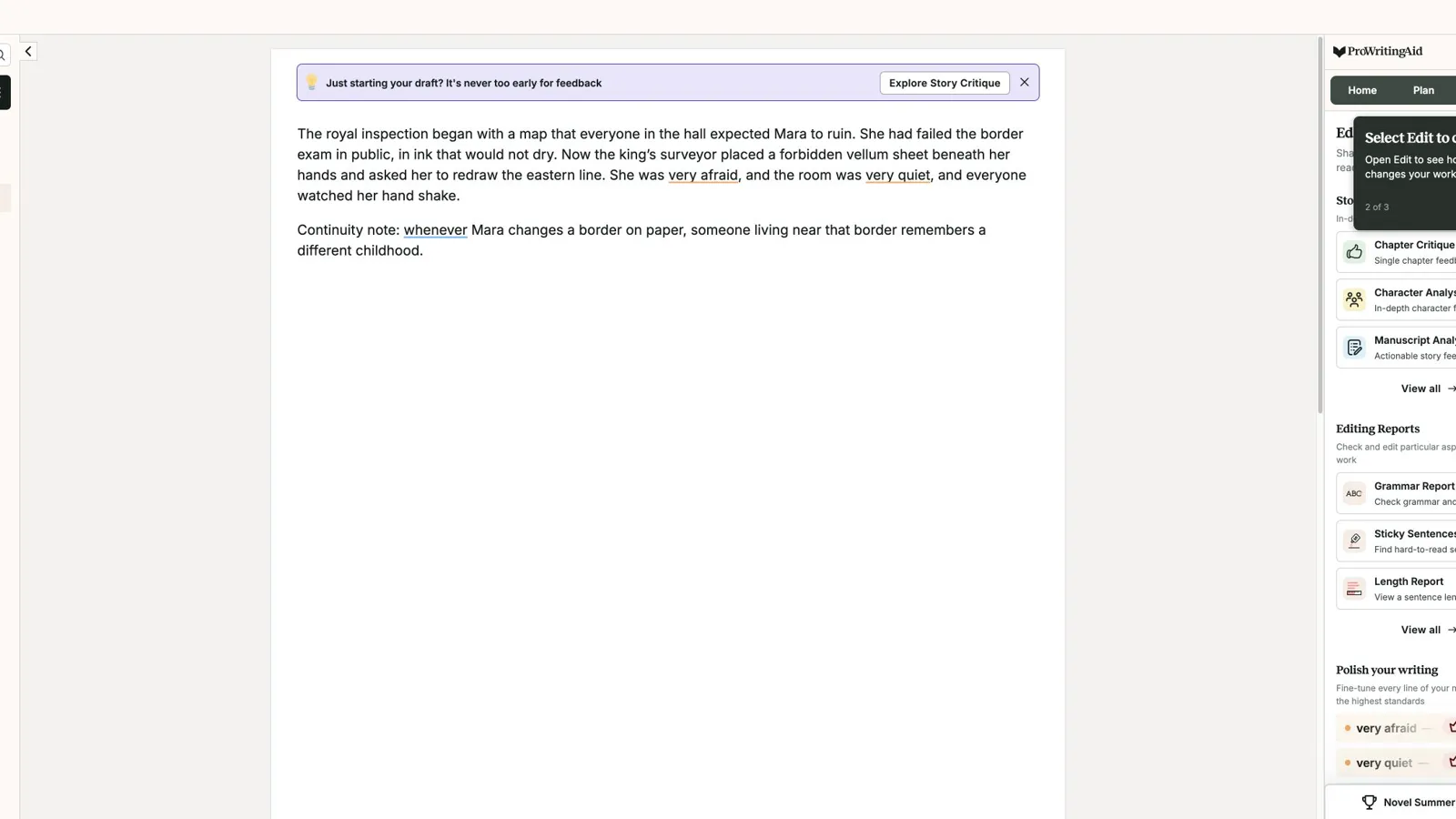
That role is useful. Many writers do not need another place to plan a book; they need a second pass on prose that has become muddy, repetitive, slow, or over-explained. ProWritingAid is built for that stage. It also clearly expects to sit alongside other writing tools: onboarding asked where the writer usually writes and included options such as Google Docs, Scrivener, Atticus, Plottr, Campfire, Ulysses, Novlr, FocusWriter, LibreOffice, and others.
That said, ProWritingAid is not a full book workspace. It can create and edit documents, but in our test it did not replace a manuscript binder, a planning board, a story bible, or a formatting pipeline. Character Analysis and Manuscript Analysis may support fiction revision, but that is not the same as managing the full book from outline to final file.
ProWritingAid makes sense when your manuscript needs editing pressure. It should not be the only book writing software in the stack unless structure, planning, and formatting are already handled elsewhere.
💬 Google Docs Review: Best Simple Free Drafting and Collaboration Baseline
Google Docs is not specialized novel writing software. That is exactly why it still belongs in the conversation.
Google Docs was the fastest tool for opening a blank document, naming it, pasting the test scene, and confirming that the document had saved to Drive. Comments, sharing, quick share, editing mode, spell and grammar checking, formatting tools, links, images, checklist, bullet lists, numbered lists, and a Gemini trial entry were visible. Sharing stayed private during the test.
For many writers, that is enough for an early draft. Google Docs is familiar, low-friction, and easy to share with a critique partner, editor, or co-writer. A writer can use headings for chapters, comments for notes, and separate documents for story planning.
The problem appears as the book grows. Google Docs does not natively understand scenes, chapters, character sheets, worldbuilding rules, timelines, or canon. It will not stop a fantasy term from drifting, keep a relationship state beside a scene, or turn a chapter outline into reusable drafting context. If chronology and reveal order matter, the writer has to build that structure manually, often with a separate story timeline.
Google Docs is strongest when you need the lowest-friction free drafting and collaboration setup. Move to a dedicated book writing tool when the document starts to behave less like a manuscript and more like a pile of pages.
✂️ Hemingway Editor Review: Best Quick Readability Pass
Hemingway Editor is not book writing software in the full sense, but it can be useful as a quick editing companion.
We pasted the shared fiction scene into Hemingway's editor. The app gave the scene a Grade 8 readability score, marked the summary as good, flagged two hard-to-read sentences, found no spelling or grammar issues, and surfaced one weakener. We observed Write, Edit, and Feedback modes, plus toolbar options for formatting, file actions, simplification, and AI tools. Trial checklist items also pointed to AI simplification, synonym, tone, length, and formality tools, but we did not use them or spend trial credits.
The strength is immediacy. Hemingway gives fast feedback on sentence density and clarity without asking the writer to build a project. That makes it useful after a chapter draft, especially if your prose tends to lean long, abstract, or overqualified.
The limit is simple: Hemingway does not plan, organize, remember, format, or manage a book. It sees the text in front of it. That is useful, but it is not a novel workflow.
Use Hemingway for a clarity pass. Do not ask it to be your manuscript system.
📦 Atticus Profile: Best for Formatting and Publishing Handoff
Atticus appears often in book writing software discussions because it is positioned around both writing and formatting. In our test, though, we could not access an active Atticus workspace. The app redirected to a sign-in screen, so read this as a product-page overview rather than a hands-on verdict.
The official Atticus homepage positions the product as a tool to write and format print books and eBooks. The page showed writing and formatting tabs, a manuscript chapter list, a previewer, and an export DOCX element in its product mockup. It also presented platform support visually for Windows, Mac, Linux, and Chromebook.
From that official-page view, Atticus is most relevant for writers who care about the publishing handoff. If your main question is "How do I turn this manuscript into a professional-looking book file?", Atticus belongs on the shortlist.
The limitation is important. We did not test project creation, chapter drafting, formatting output, export quality, collaboration, or fiction planning depth inside the app. Until that access is available, Atticus should not carry the same confidence as the tools we opened directly.
🧱 Plottr Profile: Best for Visual Outlining
Plottr belongs in the market because many writers do not want a blank outline document. They want to see the story.
We checked Plottr from its official page rather than inside an active workspace, so read this as a product-page overview. The page positions Plottr as story outlining software with a visual timeline, plot templates, character sheets, and story bible planning.
Plottr is most relevant when the problem happens before the draft: arranging plot lines, tracking story beats, and seeing how character or story threads line up across a book. It may be especially useful for writers who think visually or who want a planning layer before moving into Scrivener, Reedsy Studio, Google Docs, or another drafting tool.
The access limit matters. We did not create a Plottr project, test a visual timeline, fill character sheets, export an outline, or check the handoff into drafting. That means it should not be treated as equal to the tools we opened directly.
Put Plottr on your trial list if the outline is the messy part. Do not treat it as a full recommendation from this comparison alone if your main problem is chapter drafting, editing, formatting, or AI-assisted scene work.
🔁 Novelcrafter and Sudowrite: Covered Separately
Novelcrafter and Sudowrite both matter in this market, but they should not dominate a broad book-writing-software comparison.
The short version: Novelcrafter is usually discussed around story memory, codex-style reference material, and canon-heavy drafting workflows. Sudowrite is usually discussed around AI scene momentum, expansion, brainstorming, and recovering movement when a draft stalls.
That distinction is useful, but it deserves a focused two-tool review. If your real decision is between those two AI fiction tools, use the dedicated Novelcrafter vs Sudowrite comparison instead.
Use a simple split here: if your bottleneck is story memory, research Novelcrafter. If your bottleneck is scene momentum, research Sudowrite. If your bottleneck is bringing fiction context into AI-assisted chapter drafting, include SeaBell in the same evaluation set.
💸 Free vs Paid Book Writing Software
Free book writing software is often enough for early drafting.
If you only need to write chapters, share comments, and keep a rough outline, Google Docs may be enough. If you want a free book-oriented project with manuscript structure and export options, Reedsy Studio was the stronger starting point in our test.
Paid tools start to make more sense when the cost saves real workflow pain:
- Your manuscript is too large for one document.
- You need scene-level organization, corkboard views, or compile/export control.
- You are building a fantasy, sci-fi, or series bible with many recurring details.
- You need print/eBook formatting support.
- You want AI-assisted drafting that can stay connected to fiction context.
- You already have a draft and need stronger editing feedback.
The expensive mistake is paying for the wrong stage. Start with the bottleneck, not the price tag: a formatting tool will not solve weak scene planning, an editing tool will not organize a trilogy, an AI drafting tool will not automatically fix a missing outline, and a worldbuilding database will not help if you are avoiding the blank page.
🎯 How to Choose the Right Tool for Your Book
Use this as a quick diagnostic before signing up for anything.
Manuscript too big for a single document: test Scrivener. It is built for chapters, scenes, notes, research, corkboard cards, outline views, and compile setup. The learning curve is part of the deal.
Free writing-to-export path: test Reedsy Studio. It gives you a book project, planning board, manuscript editor, and PDF/EPUB export path without feeling as heavy as Scrivener or Campfire.
Too many worldbuilding parts: test Campfire. Its modules make sense when characters, maps, timelines, cultures, magic, systems, items, and research all need somewhere to live.
Need a guided process: test The Novel Factory. It is strongest when you want the software to walk you from premise to synopsis to plot cards to manuscript work.
Draft exists, but the prose needs pressure: test ProWritingAid or Hemingway. ProWritingAid gives deeper reports and critique-style tools. Hemingway is better for a fast readability pass.
Collaboration matters more than structure: use Google Docs. It is simple, familiar, and easy to share. Just be honest about the structure you will have to create yourself.
Formatting and publishing handoff: research Atticus and Reedsy Studio. Reedsy was tested directly here. Atticus still needs a hands-on workspace check before you rely on it for a full tool decision.
Visual outlining: research Plottr. Its official page positions it around visual timeline planning, plot templates, character sheets, and story bible organization. Because our check was official-page only, use it as a candidate for your own trial rather than as a full recommendation from this comparison.
AI assistance: separate scene momentum from story context. Sudowrite belongs in the conversation when a writer wants help moving prose forward. Novelcrafter belongs in the conversation when story memory and reference material matter. SeaBell belongs in the conversation when the writer wants fiction context close to chapter drafting inside an AI-assisted long-form workflow.
📋 A 7-Day Test Before You Commit
Do not choose book writing software from a feature table alone. Run a small version of your real writing process.
Day 1: Create a project and add your premise.
Day 2: Add one chapter outline and one scene card.
Day 3: Add two character notes and one worldbuilding rule.
Day 4: Draft a scene using those notes.
Day 5: Revise the scene after changing one earlier story decision.
Day 6: Try to export, share, or move the text into your next workflow.
Day 7: Ask what annoyed you most.
The last question matters. Good software should reduce the kind of friction you actually have. It does not need to reduce every possible kind of friction.
If you hated the setup, a complex tool may not be worth it. If your notes disappeared from view while drafting, a blank-page editor may not be enough. If the AI output ignored your story state, you may need a stronger context workflow. If formatting was painful, you may need a tool built closer to publishing.
🤖 When an AI Book Writing Workspace Is Worth Considering
AI support is not automatically useful just because the tool can generate text. For a book-length project, the harder question is whether the AI workflow can work with the story decisions you have already made.
An AI book writing workspace is worth considering when you already have planning material and the friction is moving it into the next chapter. That might mean a chapter outline, a scene card, a character relationship state, a worldbuilding rule, a style note, or a continuity warning that should shape the next draft.
The warning sign is repetition. If every session starts with rebuilding the same context, restating the same character motivation, or reminding the tool about the same hidden rule, the problem is not only drafting speed. The problem is that your notes are not close enough to the draft.
New writers often commit to AI tools before the rest of the process is defined. If the actual need is a cleaner sentence, use an editing tool. If the actual need is EPUB or print formatting, use a formatting workflow. If the actual need is a place to store hundreds of lore notes, start with a planning or worldbuilding system. AI belongs in the workflow when the next scene needs help using context, not when the surrounding process is still undefined.
SeaBell fits this category as an AI-assisted fiction workflow option, not as the best book writing software overall. It makes the most sense when the writer wants character, chapter, and worldbuilding context close to drafting rather than rebuilt in a blank prompt each time.
❓ FAQ
What is the best book writing software overall?
There is no single best option for every writer. For manuscript organization, Scrivener is the strongest tested choice. For a free writing and formatting path, Reedsy Studio performed well. For worldbuilding-heavy fiction, Campfire is strong but heavier. For AI-assisted fiction workflows, SeaBell is worth considering. For editing, ProWritingAid is a better companion than a full writing workspace.
What is the best book writing software for fiction writers?
For fiction specifically, choose based on the kind of story you are writing. Scrivener suits long manuscripts with chapters, scenes, notes, and research. Campfire suits worldbuilding-heavy fiction. The Novel Factory suits guided planning. SeaBell suits AI-assisted long-form fiction drafting where character, chapter, and worldbuilding context need to stay near the scene.
What is the best free book writing software?
Google Docs is the easiest free drafting and collaboration baseline. Reedsy Studio is stronger if you want a book-oriented workspace with manuscript structure and export options. The right choice depends on whether you need simple drafting or a more book-shaped workflow.
What is the best software for writing a book?
The best software for writing a book depends on the job you need it to do. Scrivener is stronger for manuscript organization, Reedsy Studio for a free writing-to-export path, Google Docs for simple collaboration, Campfire for worldbuilding-heavy fiction, ProWritingAid for editing, and SeaBell for AI-assisted fiction drafting with context near the scene.
What is the best free novel writing software?
For a free novel-writing setup, Google Docs is the simplest starting point and Reedsy Studio is the more book-shaped option. Google Docs is better for quick drafting and sharing. Reedsy Studio is better if you want manuscript structure, planning assets, and an observed export path in one workspace.
Is Scrivener still worth it for novel writers?
Yes, if you want manual control over a serious manuscript. In testing, Scrivener handled scene drafting, inspector notes, binder organization, corkboard view, outline view, metadata, and compile setup. It is less ideal if you want real-time collaboration, AI drafting, or a very simple interface.
Is AI writing software useful for writing a book?
Yes, but only at the right stage. AI is more useful for brainstorming, scene momentum, rewriting, dialogue variation, or turning a planning brief into draft material than it is for rescuing a scattered story system. It gets weaker when the writer expects it to solve structure, continuity, and revision without guidance.
What is the difference between book writing software and novel writing software?
Book writing software may include tools for nonfiction, formatting, export, publishing, and collaboration. Novel writing software usually needs more fiction-specific support: scenes, chapters, characters, worldbuilding, timelines, relationship states, story bibles, and continuity notes. A novelist can use general book software, but only if the missing fiction structure is handled somewhere else.
Do I need separate tools for writing, editing, and formatting?
Often, yes. A writer might draft in Scrivener or Reedsy Studio, revise with ProWritingAid or Hemingway, and format through Reedsy Studio or Atticus. All-in-one tools are convenient, but forcing one app to handle every stage can create more friction than using a small, clear stack.
Which book writing software is best for beginners?
Google Docs is the easiest starting point because it has almost no learning curve. Reedsy Studio is a good next step for beginners who want a book-shaped workspace. The Novel Factory can also work for beginners who want guided planning, though it may feel too structured for writers who prefer to discover the story as they draft.
✅ Final Recommendation
Protect the part of your writing process most likely to break.
Google Docs is enough when you need a blank page and collaboration. Reedsy Studio is stronger when you want a free book project with export options. Scrivener is the serious structure pick. Campfire is for worldbuilding that has outgrown scattered notes. The Novel Factory suits writers who want a guided planning path. ProWritingAid or Hemingway belongs after text exists and needs editing pressure.
If the real problem is not the blank page or the final export, but keeping fiction context close while drafting with AI support, include SeaBell in the shortlist. That is where an AI-assisted fiction workflow makes more sense than another generic writing app.
Related Posts
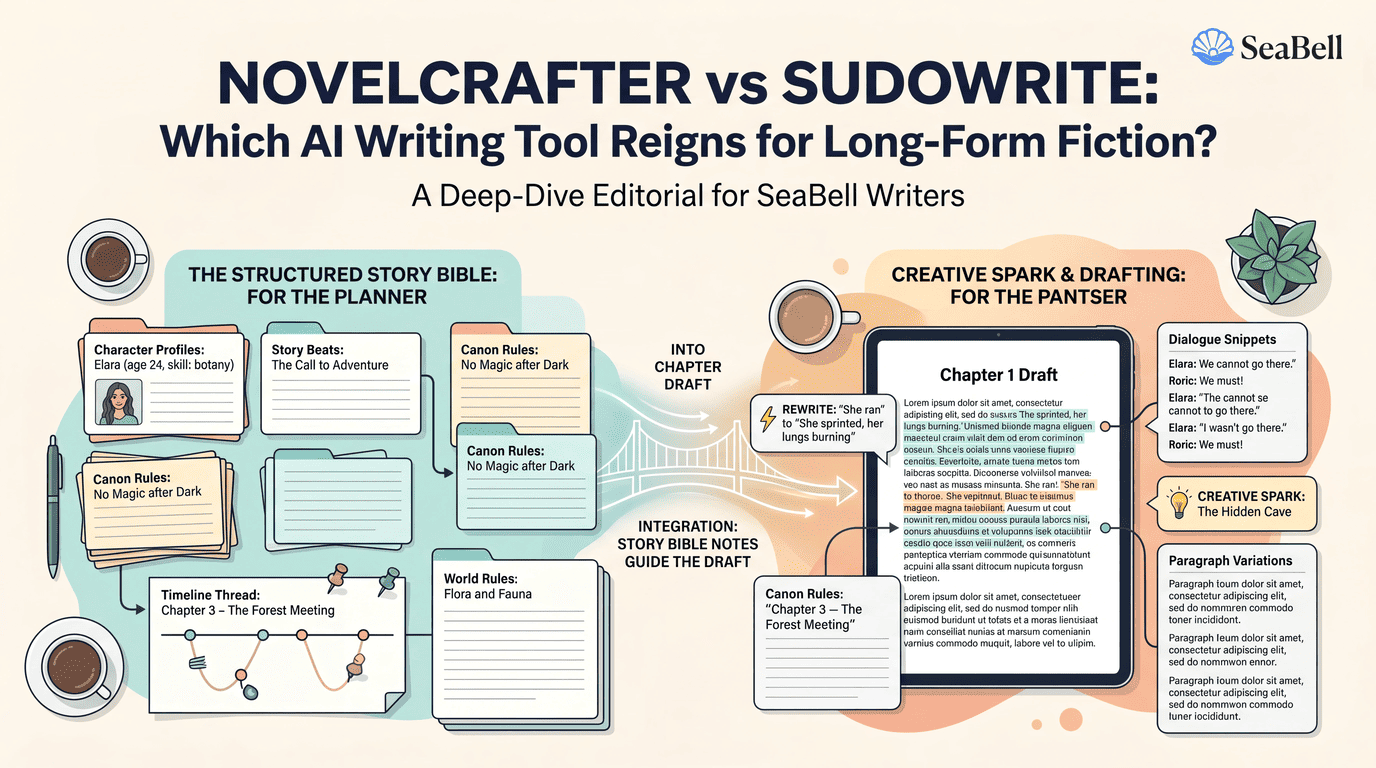
Novelcrafter vs Sudowrite: Story Memory or Drafting?
Compare Novelcrafter and Sudowrite for long-form fiction: story context, chapter drafting, setup time, revision workflow, pricing, and where SeaBell fits.
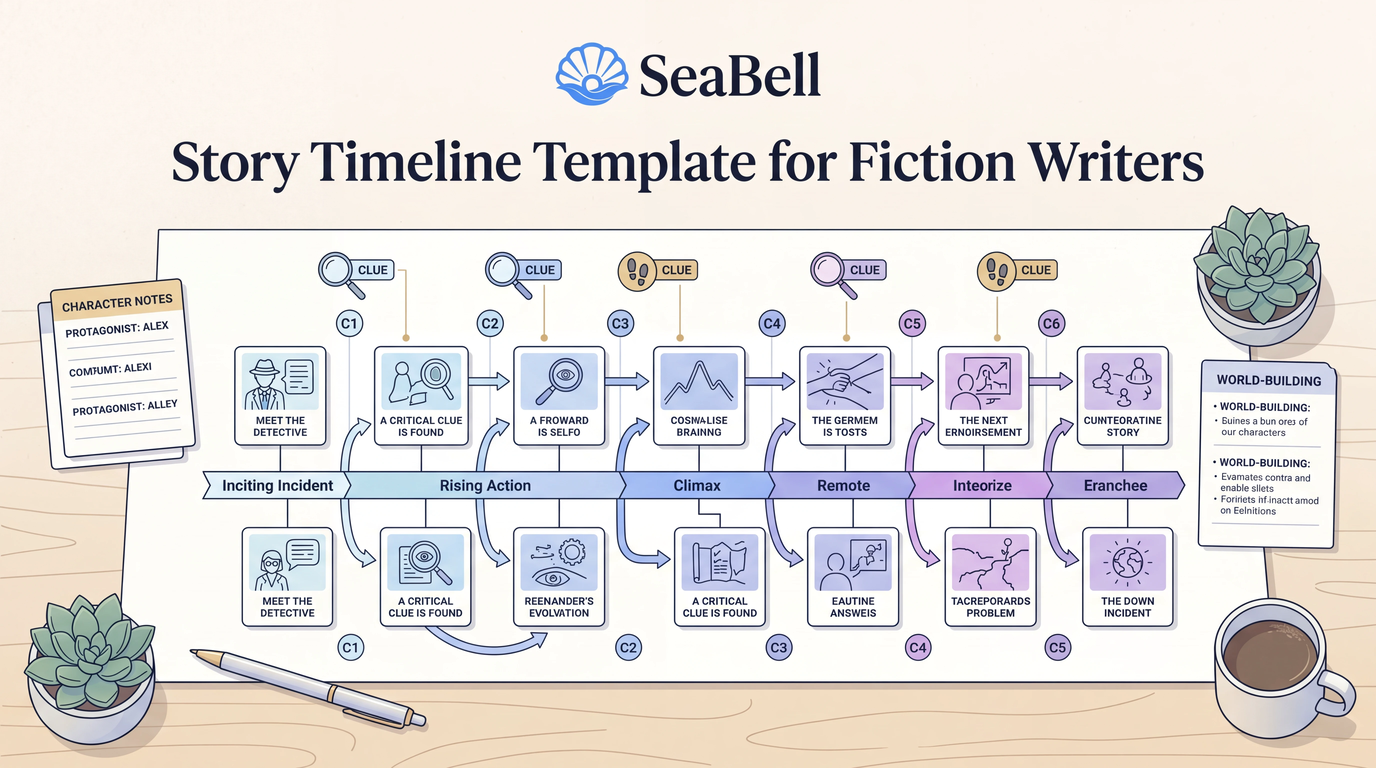
Story Timeline Template for Fiction Writers
Copy a practical story timeline template for fiction writers and learn how to track chronology, reveal order, character knowledge, clues, and revision continuity.