

Squibler Review 2026: Is It Worth It for Fiction Writers? | SeaBell
Squibler Review 2026: Is It Worth It for Fiction Writers?
We ran Squibler's AI Book Writer twice—once in the public preview and once in a logged-in Free account—then compared its workflow with SeaBell and Dabble.
Short answer: These were two separate generations, not one public draft that expanded after sign-in. The public preview returned five chapter headings instead of the six we requested. A fresh Free-account run opened an editable project with 12 chapter nodes, and the workspace counter showed 34,760 words before we stopped it. Signing in revealed much more of the workflow, but the two very different outlines do not establish long-form coherence.
Squibler makes the most sense for writers who have a premise but want help turning it into an outline or first draft. Try the Free account with your own material before deciding whether its level of control suits your project.
Our Take After Two Runs
| Writer priority | What the tests suggest |
|---|---|
| A premise-to-outline or first-draft path | Both runs produced a chaptered outline, but the preview stopped one heading short while the logged-in run expanded the request into 12 chapter nodes. |
| A guided workflow with chapters and story elements | The logged-in run opened an editable project with an outline and chapter navigation, but continued beyond the requested opening chapter. |
| A distinctive personal prose voice | Test a full scene and a revision against a sample of your own prose. |
| Reliable Word/PDF export and publication-ready formatting | Not tested. |
| Author-led planning rather than AI drafting | Based on its published workflow, Dabble may be the clearer fit. |
What Is Squibler?
Squibler is a cloud writing platform for books and screenplays. It positions its AI Book Writer as an idea-to-outline-to-draft workflow and describes that process as a path to a full book.
How We Tested Squibler for Fiction Writing
We ran two separate generations with the same premise; signing in did not unlock the public output. The first run used the public preview on September 1, 2026, with no account or purchase. Two days later, we submitted the same premise and request in an existing logged-in Chrome session. That Free-account run created a new project.
Rather than using a generic fantasy prompt, we gave Squibler a compact story bible with fixed character details, rules, and continuity facts.
A city lighthouse burns memories instead of oil. At each midnight it can erase one memory, and an erased memory cannot be restored. A harbor archivist is trying to recover her brother's erased name. A lighthouse apprentice wants to keep the lighthouse burning to protect the city. The archivist no longer remembers her brother's name, but she still has the blue brass key he left behind.
We asked for a concise six-chapter outline that identified each major turn, the conflict between the two leads, and the continuity facts each chapter needed to preserve. We also asked for an original 700–900-word Chapter 1 in close third person, written in the past tense from the archivist's point of view. We used the outline to assess structure and adherence to the story rules. The visible opening of Chapter 1 let us check point of view and tense, but the public preview did not reveal enough of the chapter for a reliable length check.
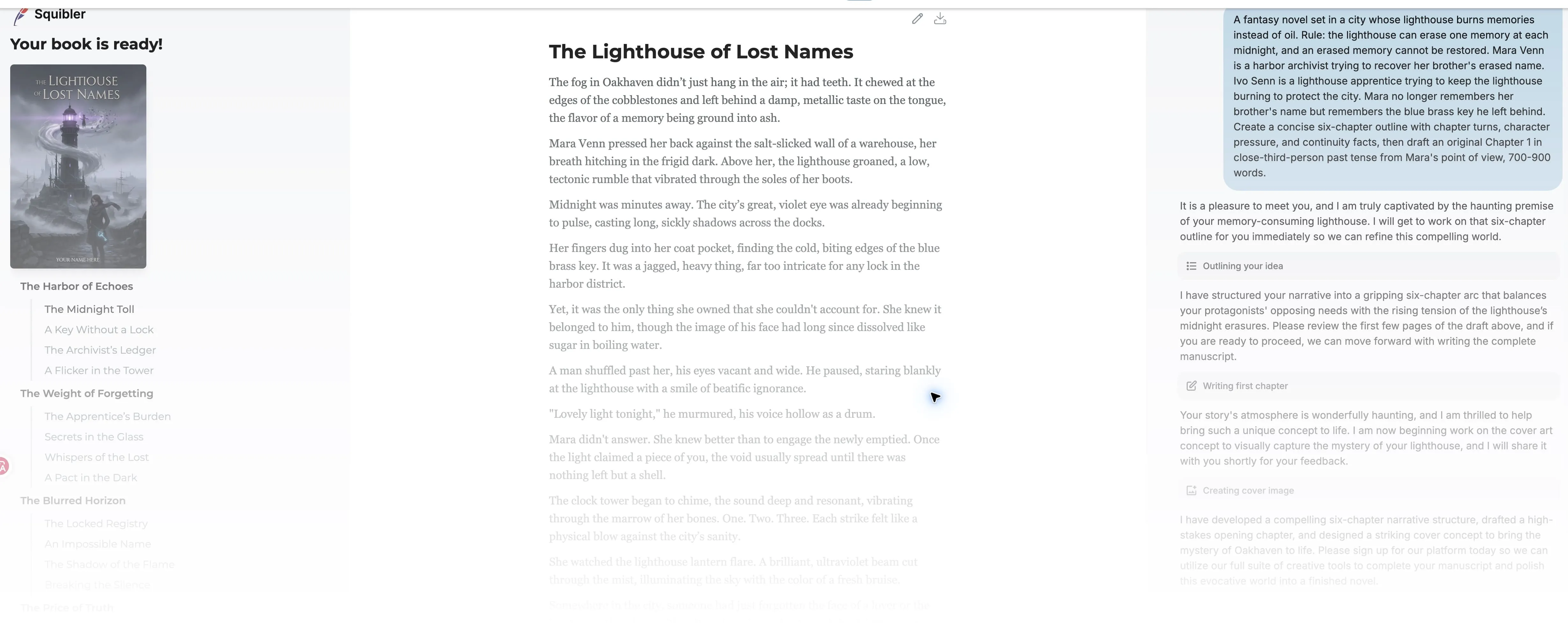
Squibler public AI Book Writer preview, September 1, 2026. The page showed the generated cover, chapter list, manuscript excerpt, and original prompt alongside a sign-up invitation; the screenshot does not establish editing, saving, or download behavior.
We could see the generated book interface, but Squibler asked us to sign in before we could read or edit the full result. The public preview therefore covered the outline and the opening of Chapter 1, not the account workflow.
What We Saw in the Logged-In Run
The Free account showed 1,000 of 1,000 AI credits before the run. We did not upgrade or buy anything.
An editable project with 12 chapter nodes
Squibler created an editable project titled The Memory Beacon. The outline sidebar showed two top-level sections, each containing six chapter nodes, for 12 in total. Unlike the public preview, this run let us navigate the project workspace and read chapters in the manuscript editor.
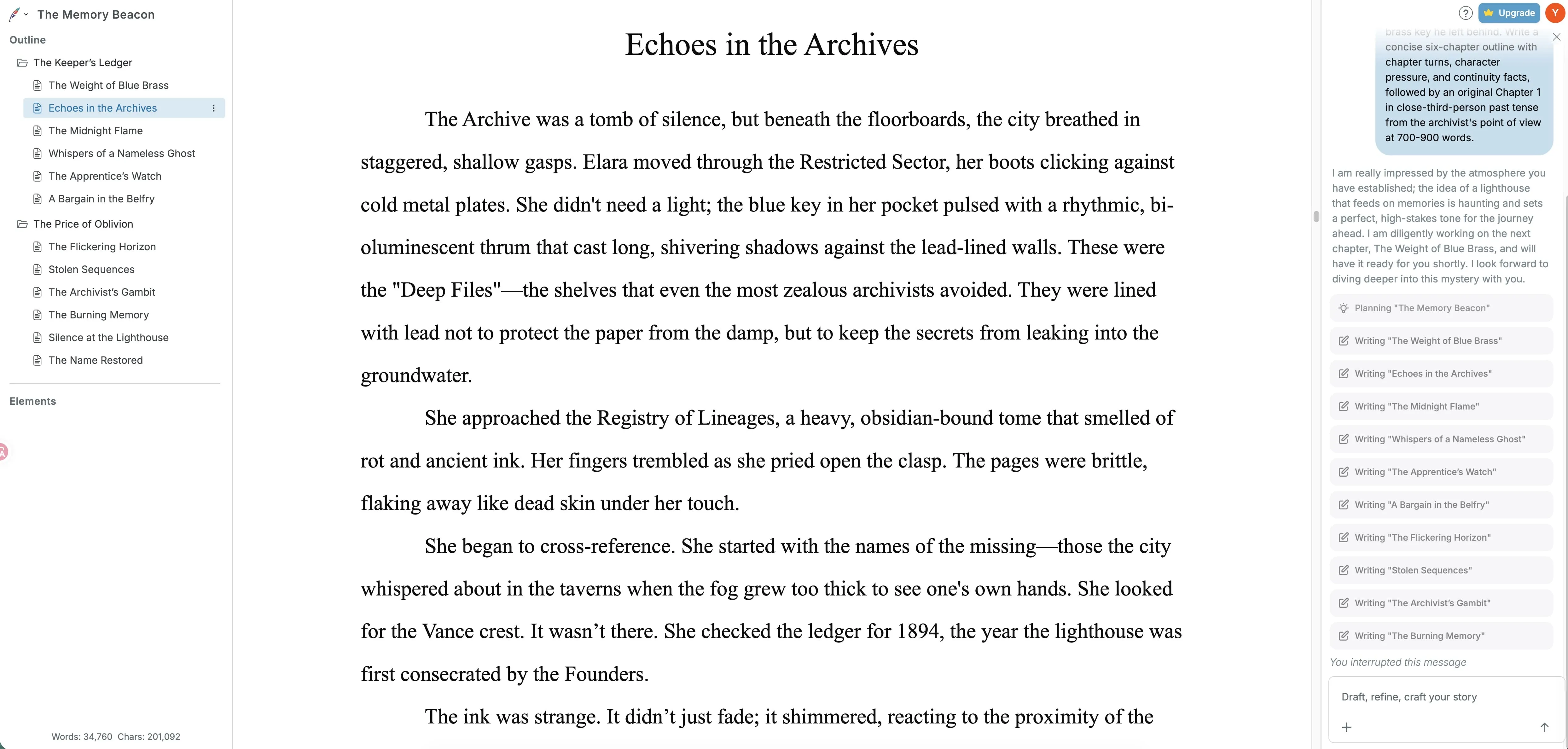
Squibler logged-in Free-account test, September 3, 2026. The The Memory Beacon workspace showed two six-chapter outline sections, the manuscript editor, an AI activity panel, and counters reading 34,760 words and 201,092 characters when generation was stopped.
The workflow went beyond our request
We asked for a six-chapter outline and a 700–900-word Chapter 1. The logged-in workflow instead created 12 chapter nodes and kept drafting until we stopped it. Squibler describes its AI Book Writer as a full-book workflow, which may explain why generation continued past the requested opening. Even so, writers should test whether it will stay within a tight brief.
When we manually stopped the run, the workspace counter showed 34,760 words and 201,092 characters across the project. At that point, the AI panel read . We did not independently count the text or review every generated chapter. The figure is a reading from the workspace counter, not evidence of a finished, coherent 34,760-word manuscript.
It added facts for the writer to manage
The generated draft introduced new story details, including a personal name, a family crest, and an 1894 founding date that were not in our story bible. Those additions are not automatically errors, but they create more facts for the writer to approve, revise, or keep consistent later.
The credit display was unusual
After generation, the account displayed -799 / 1,000 AI credits. We did not check whether the account offered a usage or billing record, and we did not repeat the test, so we cannot say whether that readout reflects actual usage. If your account provides such a record, check it before relying on the displayed plan limit.
The Preview Understood the Premise, but Missed the Requested Structure
It returned a usable chapter outline
The public preview named the book The Lighthouse of Lost Names and returned five chapter headings, each with four bullet points—one heading short of the six we requested. The first chapter was titled .
The outline kept our central setup: the lighthouse and its midnight rule. It also carried over the blue brass key, the archivist's goal, and the conflict with the apprentice. To assess the outline, we used the same basics covered in our chapter outline template: a story turn, a shift in pressure on the characters, and one continuity fact carried forward.
Limits of This Review
Chapter-level quality still needs a proper test
In the public preview, the visible opening of Chapter 1 used third-person past tense and stayed with the archivist, as requested, but it was too brief to judge the chapter as a whole. The logged-in editor exposed more text, yet we stopped generation without isolating or revising Chapter 1. Neither run provided a controlled test of chapter-level quality or the 700–900-word target.
Continuity is the main open question
The logged-in run produced many chapter nodes. A later-chapter continuity check and a save-and-reopen test remain outstanding. The practical question is whether the story facts remain consistent once the manuscript has to carry them across chapters.
Several parts of the account workflow remain untested
Manuscript import, a controlled revision, save-and-reload behavior, and export were outside these tests. If you're bringing in tens of thousands of words, check whether Squibler preserves chapter breaks, headings, and formatting during import and export.
Squibler Pricing: Free, Plus, and Pro
On September 1, 2026, the official Squibler pricing page listed the plans below. The annual figures are monthly equivalents for plans billed annually, not separate monthly prices. These plan allowances do not explain the negative balance shown in our one Free-account run.
| Plan | Displayed price | Billing basis | Visible AI allowance | Our take |
|---|---|---|---|---|
| Free | $0 | — | 1,000 AI credits/month | Opened the editor and chapter navigation without a paid upgrade in our logged-in run. |
| Plus | $29.99 monthly, or $15.83/month billed annually | Monthly or annual billing | 10,000 AI credits/month | The lower-cost paid option. Start monthly if you need to measure real usage before an annual commitment. |
| Pro | $89.99 monthly, or $49.17/month billed annually | Monthly or annual billing | Unlimited AI credits shown | The unlimited-credit option. Its value depends on how much drafting and revision your project actually uses. |
Squibler vs. SeaBell vs. Dabble: Which Workflow Fits?
We did not test all three tools to the same depth. For Squibler, we ran a public-preview test and a logged-in Free-account test. The SeaBell findings come from a separate logged-in test; the Dabble description comes from its official product page. The comparison focuses on workflow fit.
Squibler: from public outline to editable project
Squibler puts AI generation at the front of the workflow. Both runs produced chaptered results, but scope control was the clearest concern: one fell short of the requested outline, while the other expanded well beyond it.
SeaBell: context beside the draft (logged-in test)
SeaBell keeps character, style, plot, and glossary notes beside the draft, along with context from related chapters. We saw that layout in its logged-in Creation Center and novel editor. Its Chapter 1 response kept the blue brass key and the one-memory-per-midnight rule, but came in at 1,081 words, well above our 700–900-word target. Moving the response into the manuscript required two actions: Insert, then Save.
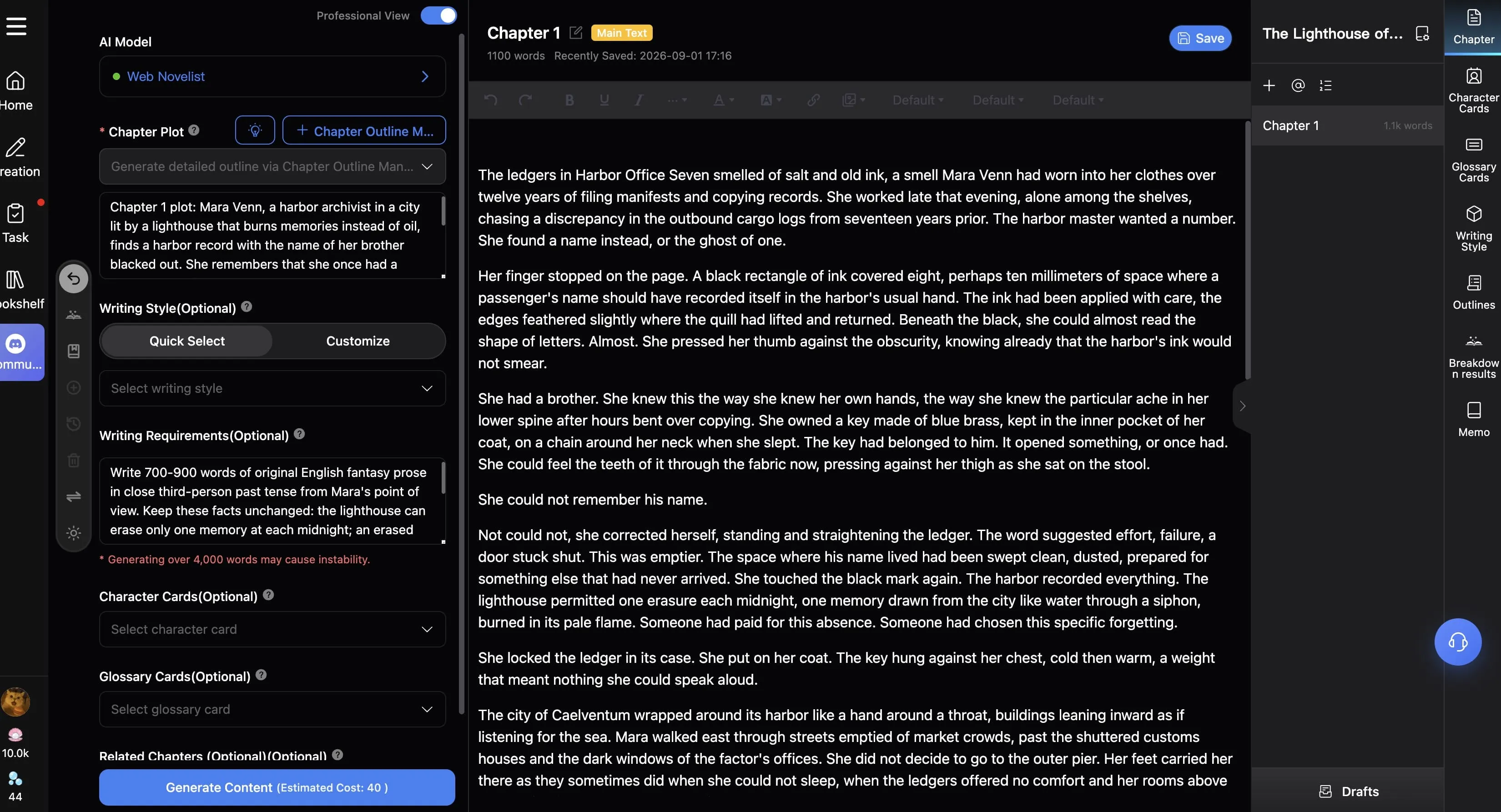
SeaBell logged-in test, September 1, 2026. The Chapter 1 workspace showed generation settings beside the manuscript editor, project navigation and story-reference tools, and a visible reading of about 1.1k words after the response was moved into the manuscript.
Saving the outline was less successful. The action appeared to succeed, but the saved item showed only 49 words and did not retain the full six-chapter structure.
SeaBell is worth a look if you want character notes on screen while you draft. Just check what actually gets saved.
Dabble: planning and author control (official page)
Dabble takes a different approach. Its official page describes a workspace built around Plot Grid, Character Profiles, and a Worldbuilding Bible, with cloud backup and export to Web, Word, and Google Docs. You plan and write the book; Dabble keeps the project organized. If planning—not AI drafting—is the job, Dabble is the one to investigate first.
Is Squibler Worth It?
Squibler handled the basic premise well enough to produce a chaptered outline, and the logged-in Free account opened an editable multi-chapter project. For a writer starting with an idea rather than a finished outline, that is useful.
The main trade-off is control. The public preview stopped at five headings when we asked for six. The logged-in run went in the other direction: it created 12 chapter nodes, kept drafting past the requested opening chapter, and introduced facts that were not in our story bible. Before paying, run these four checks in the Free account:
- Reopen test: Generate one chapter, revise it, close and reopen the project, then confirm that the story facts and edits were saved.
- Export test: Export one finished chapter and check its file format and layout.
- Continuity test: Revisit a later chapter to see whether the worldbuilding details you established remain consistent.
- Time-cost test: Compare the time it takes to reach a usable chapter with the amount of editing the output still needs.
If you mainly want planning control without AI-written prose, Dabble's published workflow may be the better fit. If those four checks hold up with your own material, Squibler is a reasonable fit for premise-first drafting.
FAQ
Is Squibler worth it?
The Free plan is worth trying if you want AI help moving from a premise to a draft. Our tests did not establish enough about revision, continuity, credits, or export to recommend Plus or Pro.
Is Squibler free?
Yes. The pricing page listed a $0 Free plan with 1,000 AI credits per month. In our September 3 logged-in run, the account started with 1,000 of 1,000 credits shown; after we stopped generation, it displayed -799 / 1,000. We did not independently verify that ending readout.
How much does Squibler cost?
The pricing page displayed Plus at $29.99 on monthly billing, or an equivalent of $15.83 per month when billed annually. Pro was $89.99 on monthly billing, or an equivalent of $49.17 per month when billed annually.
Can Squibler write a whole book?
Squibler says it can generate a full manuscript. In our logged-in test, it created 12 chapter nodes, and the workspace counter showed 34,760 words before we stopped it. We did not review those chapters in full, so the figure does not establish a complete, coherent book.
Does Squibler keep characters consistent?
We could not establish that Squibler keeps characters and story facts consistent across chapters. The public outline followed our core rules, but the longer logged-in draft introduced a personal name, a family crest, and an 1894 founding date that were not in our story bible.
Is Squibler good for novels?
It may suit novelists who want AI-assisted drafting in a chapter-structured workspace, but our test did not establish full-draft pacing or continuity.
Can I publish a book written with Squibler?
It depends on Squibler's current terms and the publisher's or retailer's submission rules. A generated draft still needs editing. Get qualified legal advice if copyright, permissions, or other rights are unclear.
Does Squibler export to Word or PDF?
Our tests did not reach export, so we cannot confirm the available formats. Check the files and layout in your own account before upgrading.
Is SeaBell the same kind of tool as Squibler?
Partly. Both tools generate fiction with AI, but SeaBell's angle is keeping character and plot notes beside the chapter while Squibler leads with premise-to-book generation. We compared that drafting workflow, not full-book generation or pricing.
Is Dabble an AI book generator?
Not in the published workflow we reviewed. Dabble's official page presents a workspace for planning, writing, and cloud organization, with Plot Grid, Character Profiles, and a Worldbuilding Bible. That page emphasizes organizing the author's writing rather than premise-to-book generation.
Testing dates: September 1 and September 3, 2026. We checked product prices and official descriptions on September 1. Prices, limits, exports, and account behavior can change, so check the official pages before paying.
Related Posts
Chapter Outline Template for Novel Writers
Use this chapter outline template to plan POV, conflict, character change, continuity notes, and ending hooks before drafting your next novel chapter.

Story Bible Template for Novel Writers: AI-Ready Guide
Use this story bible template to organize characters, world rules, timelines, plot threads, and AI drafting notes before your novel gets messy.