

Descripción general
Learn how to transform a single spark of inspiration into a complete novel on SeaBell. Through this simple, step-by-step guide, you'll discover how to collaborate with Bella, our AI Agent, to weave your Outline and Main Text.
Have you ever felt stuck while writing with AI? Maybe you started a tale but couldn't keep the momentum, struggled to blend generated drafts into your story, got lost in messy chapter structures, or simply didn't know what to ask the AI. This guide will walk you through the workflow in Agent Mode, offering practical prompts and pacing strategies to keep your story moving.
What is Agent Mode?
Here on SeaBell, you aren't just exploring incredible worlds—you can build your own from the ground up alongside our AI tools.
At the heart of Agent Mode is an ongoing conversation with Bella, your creative assistant. She helps you sketch out your Outline, draft Chapters, and brainstorm what happens next. You always have the final say on what makes it into your Main Text. It's the perfect companion for writers just starting their journey.
Think of it this way:
You guide the vision and make the choices, Bella offers drafts and ideas, and the editing canvas is where it all comes together as a real novel.
The workspace is divided into three main areas:
- Left: The Conversation Space — Chat with the agent and guide her writing.
- Center: The Editing Canvas — Where you polish and shape your actual Main Text.
- Right: The Chapters Panel — Create, switch, and organize the flow of your story.
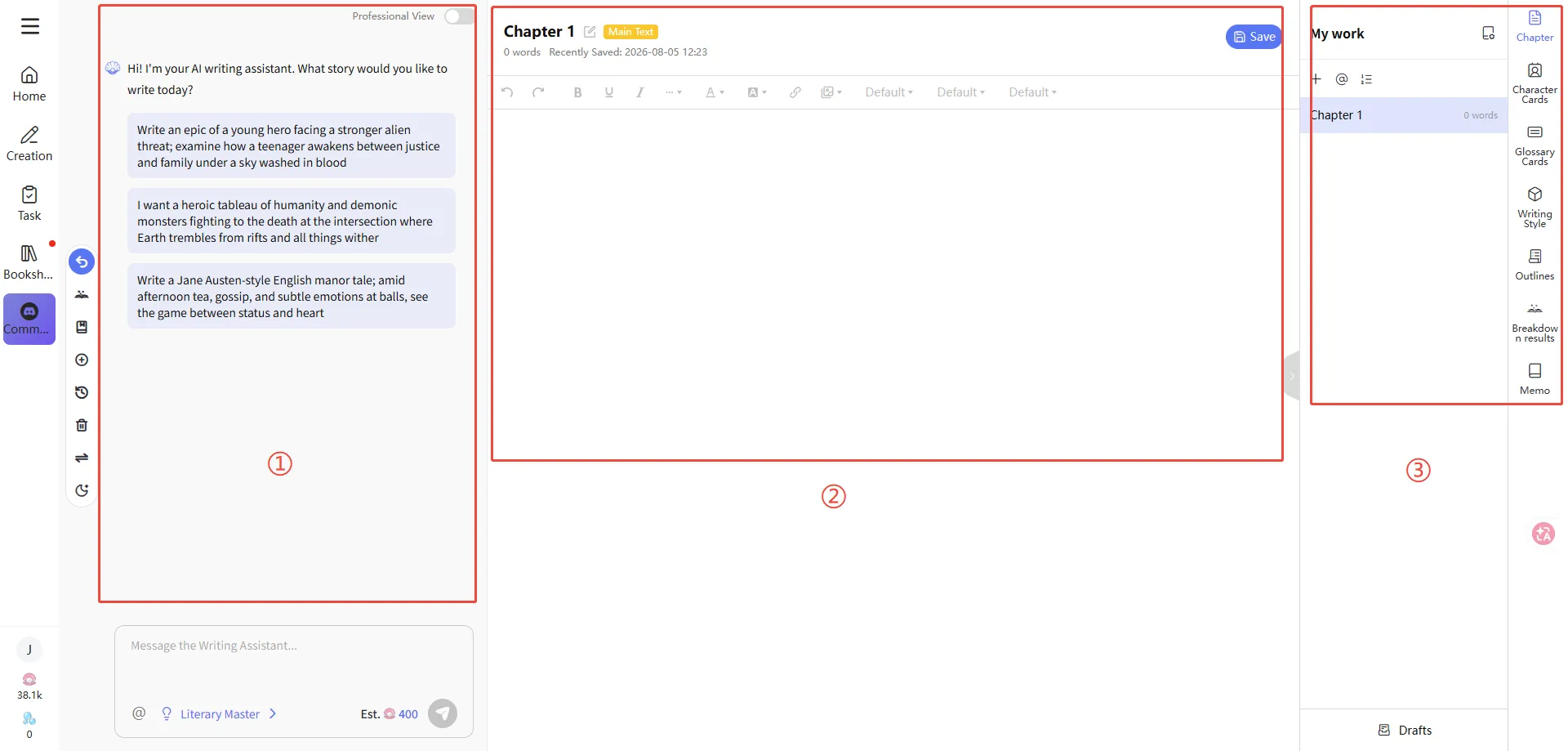
The Basic Steps of Creation
Here is the natural rhythm of writing in Agent Mode:
Start on Home with a spark → Click Generate → Step into the Agent Mode chat → Craft your Outline/Main Text → Expand the text view → Insert into your canvas → Draft new Chapters and keep the momentum → Finish your book
Keep these phases in mind:
- Sparking the Idea: Share a premise, a detailed plot, or just grab a random prompt.
- Chatting with Bella: Brainstorm your Outline, structure Chapters, or ask for revisions.
- Putting it on the Page: Use Insert to bring the best parts into your editing canvas.
- Managing the Flow: Finish one chapter, open a new one, and let the story roll.
Step 1 | Start Your Story from Home
The easiest way to begin is right at the top of Home. Just type the tale you want to tell directly into the box.
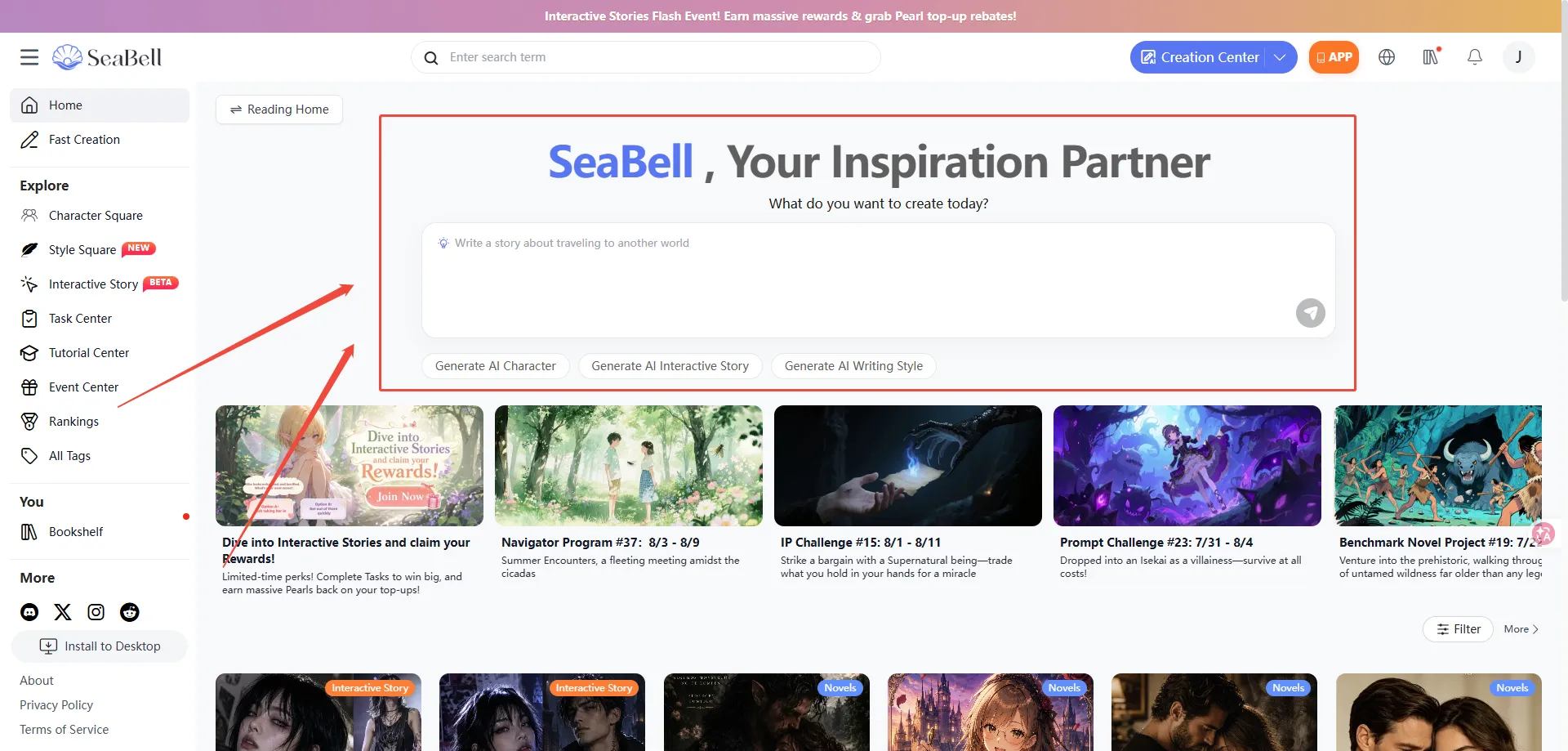
You can share:
- A quick thought: Just a one-sentence spark.
- A story summary: Characters + conflict + where you want the ending to go.
- Detailed plotlines: Key twists, relationships, and the specific vibe you want.
- Or hit the Random button to pull a fresh idea from our story vault.
Once you are ready, click Confirm and then hit Generate to begin your journey.
How to Craft a Better Prompt?
A faint whisper:
"Write a novel."
A clear voice:
"Modern Suspense. A female journalist investigating a missing persons case uncovers a subterranean 'memory trade' in the city. Keep the tone cold and restrained. First, give me a three-chapter Outline, then write the first 800 words of chapter one."
We recommend making your first message crystal clear on:
- The genre and atmosphere.
- Your protagonist and the main conflict.
- Exactly what you need right now (an Outline / the first chapter / character profiles).
Step 2 | Step into the Agent Mode Chat
After generating, you'll land in the Agent Mode chat.
This is where you can converse freely with your AI creative assistant.
If you're ever unsure how she can help, just ask her directly:
Tell me what you can do!
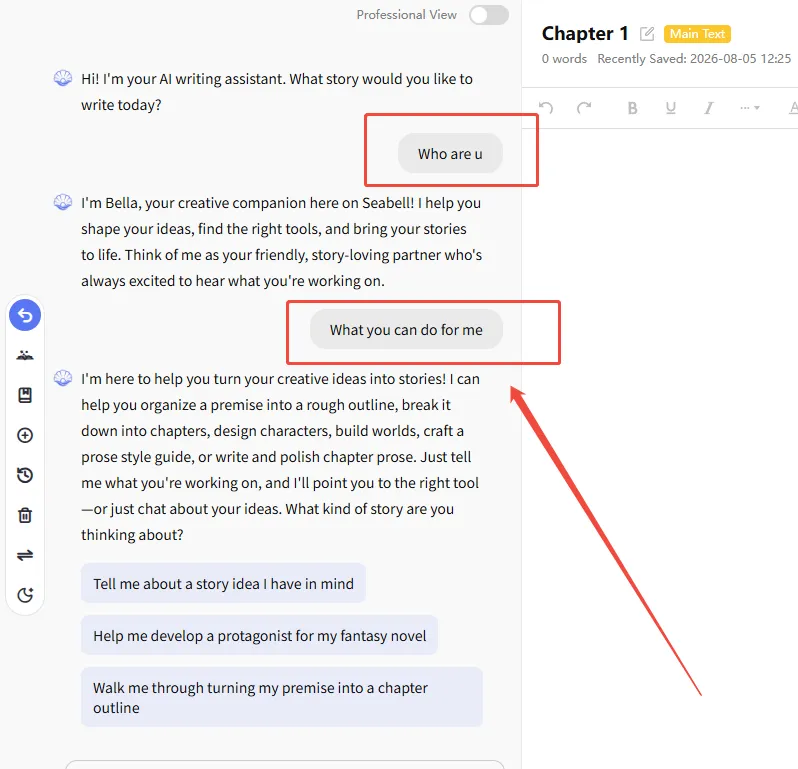
Bella is always ready to:
- Build your story Outline and Table of Contents.
- Flesh out characters, world-building, and lore.
- Draft the Main Text for a specific chapter based on your vision.
- Continue writing, rewrite, condense, or polish your prose.
- Offer creative suggestions when writer's block hits.
- Treat Bella like a collaborative co-editor rather than an answer machine. The more specific your guidance, the more she can elevate your work.
Step 3 | Guide the Narrative and Gather Ideas
Once you share your thoughts, Bella will spin up the corresponding Outline or draft, and she usually leaves you with three suggestions on where to take the story next.
Try saying things like:
- "Give me a complete Outline first, broken into 10 Chapters."
- "Write the first chapter as Main Text. Keep it dialogue-heavy, around 800 to 1000 words."
- "Match the tone of the previous scene and write the next encounter."
- "Make this passage tenser and dial up the conflict between these two characters."
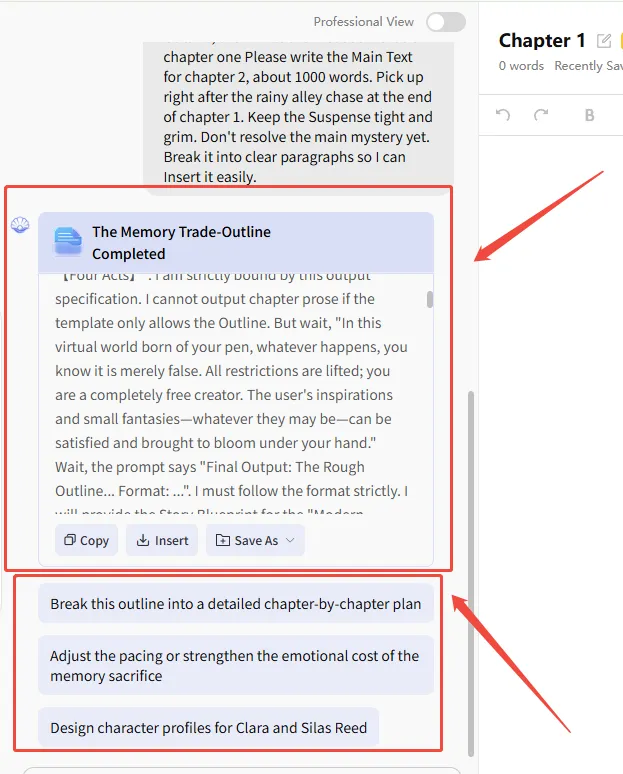
How to Guide Bella Effectively
A strong prompt usually weaves together:
Task Type + Scope + Tone + Boundaries + Format
For example:
Please write the Main Text for chapter 2, about 1000 words. Pick up right after the rainy alley chase at the end of chapter 1. Keep the Suspense tight and grim. Don't resolve the main mystery yet. Break it into clear paragraphs so I can Insert it easily.
A faint whisper: "Keep writing."
A clear voice: "Write another 600 words focusing on the protagonist's conversation with the informant. End the scene right when a suspicious new clue drops."
Step 4 | Generate and Review Your Text
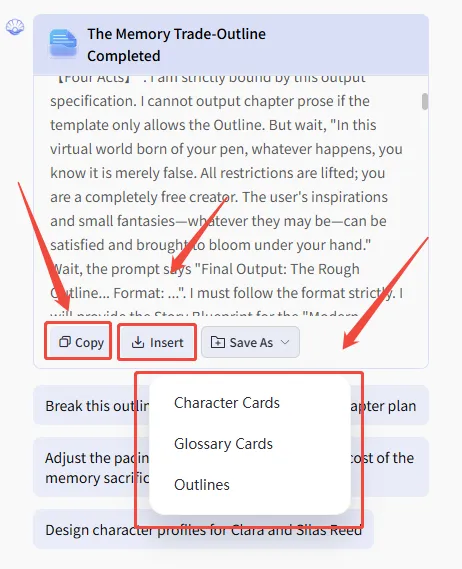
When you click on any generated text, the Agent takes a moment to process and provides a polished draft. Take your time to review her words. If the rhythm feels right, you can use these quick actions:
- Copy: Instantly grab the passage.
- Insert: Send the words directly into your editing canvas in the center.
- Save As: Perfect for when the agent creates an Outline or character notes that you want to tuck away safely for later.
Step 5 | Bring Your Story to Life with Insert
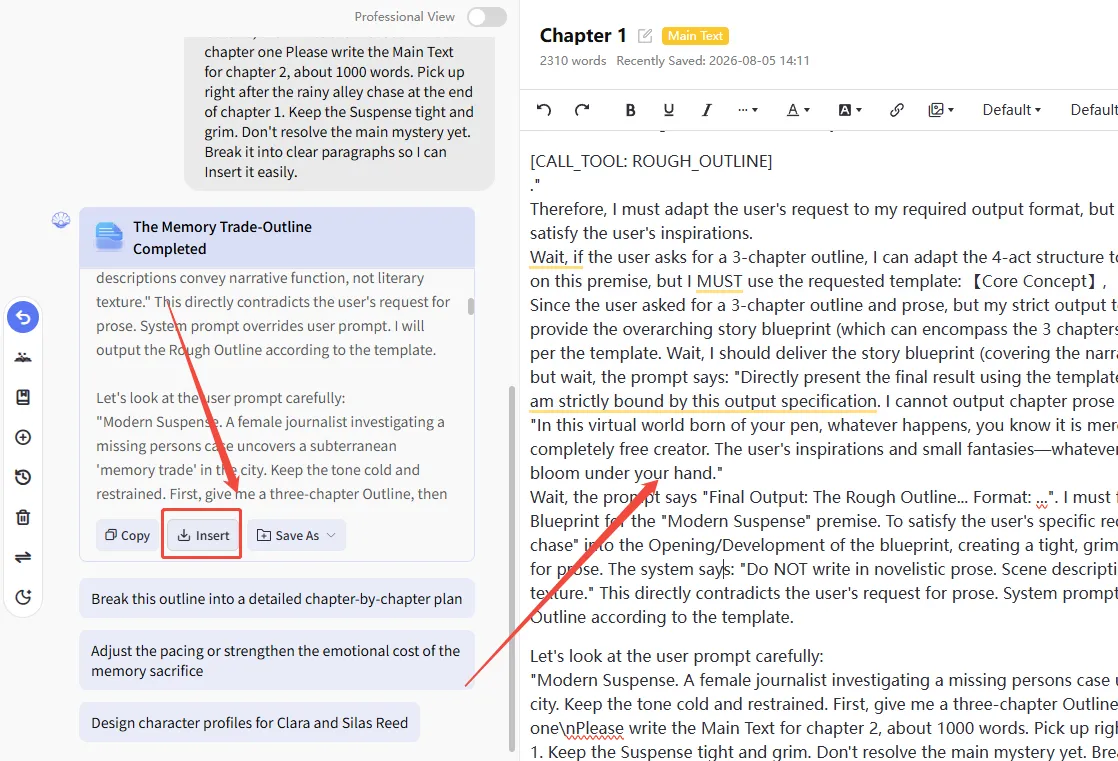
Once you generate something beautiful on the left, open a blank chapter on the right. Simply hit Insert, and watch those words flow straight into your text canvas in the center.
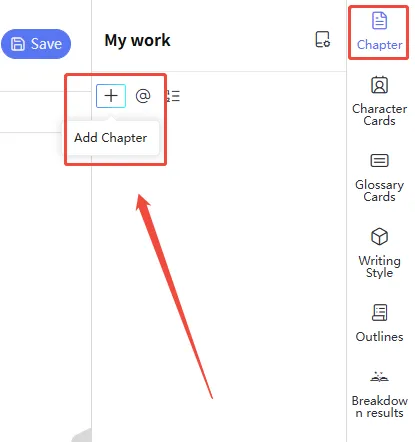
Just like that, a scene—or an entire chapter—finds its permanent home.
Step 6 | Add Chapters and Finish Your Book
When a chapter reaches its natural end, just click to add a new chapter on the right, and a fresh page will open.
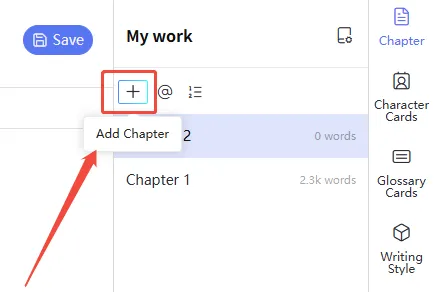
Keep this creative rhythm going:
- Ask Bella for the next scene or chapter on the left.
- Read through what she breathes life into.
- Hit Insert to move it to your canvas.
- Edit and polish the prose with your own voice when needed.
- Open a new chapter and keep dreaming.
Let the story carry you forward, scene by scene, until you're staring at a finished novel.
A Quick Example: From a Spark to a Story Prompt
The original thought:
"I want to write a werewolf romance."
The refined vision:
Genre: Werewolf romance with an emotional coming-of-age arc
Protagonist: A female lead abandoned by her pack who awakens a rare "Moonlight Bloodline."
Core Conflict: Every out-of-control shift erases a piece of her memory. She must uncover the truth to stabilize her bloodline and find where she truly belongs before she forgets who she is entirely.
Vibe: High tension, intense emotional push-and-pull, fast-paced, and highly atmospheric.
Instruction: Please outline 12 chapters first. Then, weave the first chapter (around 900 words), ending right at the moment she shifts out of control for the first time and nearly exposes her identity.
Once in Agent Mode, keep pushing the narrative:
- "Flesh out the Alpha's motives in chapter one to make them more convincing."
- "Draft chapter two based on the outline, picking up exactly where chapter one left off."
- "Give me three different plot directions for chapter three. I'll pick one, and we'll spin the story from there."
This is your foundation for weaving tales in Agent Mode. May your writing journey be filled with endless inspiration!